Most Demanding PC Games That Push Modern GPUs to Their Limits

Modern PC gaming continues to reach new heights with realistic graphics, advanced lighting systems, and massive open worlds. Game developers now create experiences that look almost identical to real life, which places a heavy load on graphics cards. Players who want smooth frame rates, ultra settings, and high resolutions often need powerful hardware to enjoy these titles without performance issues.

Many modern games use technologies such as ray tracing, detailed textures, dynamic weather systems, and complex physics calculations. These features create stunning visuals but also demand a great deal from GPUs. Whether you own a high-end gaming PC or plan to upgrade your system, understanding which games push graphics hardware the hardest can help you make better decisions. Here are some of the most demanding PC games that challenge even the strongest GPUs available today.

Most Demanding PC Games That Push Modern GPUs to Their Limits

Several modern titles stand out because they require exceptional graphics performance. These games test GPU power through advanced rendering techniques, large environments, and detailed visual effects.

Cyberpunk 2077

Cyberpunk 2077 remains one of the toughest games for modern graphics cards. The game features a massive futuristic city packed with detailed buildings, reflections, lighting effects, and crowds.

Key reasons for its high GPU demand include:

  • Full ray tracing support
  • Path tracing technology
  • High-resolution texture packs
  • Dense urban environments
  • Advanced lighting effects

Players who enable path tracing at 4K resolution often need flagship GPUs to maintain smooth gameplay.

Alan Wake 2

Alan Wake 2 delivers some of the most realistic visuals seen in gaming. The developers built the game around advanced rendering technologies that create lifelike environments and cinematic lighting.

GPU-intensive features include:

  1. Ray-traced reflections
  2. Ray-traced shadows
  3. Detailed environmental effects
  4. High-quality global illumination
  5. Dense forest environments

Even powerful graphics cards can struggle when players activate maximum settings.

Microsoft Flight Simulator

Microsoft Flight Simulator presents an enormous challenge for gaming hardware. The game recreates the entire planet using satellite data, detailed terrain models, and realistic weather systems.

Several elements increase GPU usage:

  • Real-time cloud rendering
  • Detailed aircraft models
  • High-resolution terrain data
  • Dynamic weather effects
  • Massive draw distances

Flying over major cities often pushes both the GPU and CPU close to their limits.

Black Myth: Wukong

Black Myth: Wukong gained attention for its impressive graphics and advanced Unreal Engine technology. The game features detailed environments, realistic lighting, and high-quality character models.

Performance-heavy elements include:

  • Unreal Engine 5 technology
  • Nanite geometry system
  • Lumen lighting
  • Detailed particle effects
  • High-resolution textures

Many players lower settings to maintain stable frame rates during intense combat scenes.

Starfield

Starfield combines large planetary environments with detailed cities and space exploration. The game places considerable pressure on graphics hardware, especially at higher resolutions.

Demanding features include:

  • Large-scale environments
  • Detailed lighting systems
  • High texture quality
  • Extensive visual effects
  • Massive world rendering

A strong GPU helps maintain smoother performance during exploration and combat.

Avatar: Frontiers of Pandora

Avatar: Frontiers of Pandora showcases lush alien landscapes filled with vegetation, wildlife, and dynamic weather systems.

The game stresses GPUs through:

  • Dense forests
  • Ray-traced lighting
  • Advanced foliage rendering
  • High-quality shadows
  • Large open-world environments

Players often need modern graphics cards to experience the game at its highest settings.

Why Modern PC Games Require Powerful GPUs

Modern game development focuses heavily on visual quality. Developers continue to push graphical boundaries with every new release.

Several technologies increase GPU workload:

Ray Tracing

Ray tracing simulates realistic light behavior. It creates accurate reflections, shadows, and lighting effects. While the results look impressive, the process requires significant graphics processing power.

High-Resolution Textures

Modern games often include 4K and even 8K texture assets. These files improve visual detail but consume large amounts of video memory.

Open-World Environments

Large maps contain thousands of objects, structures, and environmental effects. GPUs must render these elements continuously as players move through the world.

Advanced Physics Systems

Modern physics engines create realistic destruction, weather effects, water simulation, and object interactions. These calculations increase hardware demands.

Higher Display Resolutions

Many gamers now use:

  • 1440p monitors
  • 4K displays
  • Ultrawide screens
  • High-refresh-rate monitors

Higher resolutions require the GPU to process millions of additional pixels every second.

GPU Features That Help Handle Demanding Games

A powerful graphics card includes features that improve gaming performance and image quality.

Large VRAM Capacity

Video memory stores textures, models, and graphical assets. Modern demanding games often benefit from GPUs with 12GB, 16GB, or more VRAM.

AI-Based Upscaling

Technologies such as AI upscaling help increase frame rates while maintaining visual quality. These systems render games at lower internal resolutions and then improve image clarity.

Benefits include:

  • Higher frame rates
  • Reduced GPU workload
  • Better gaming performance
  • Improved visual quality

Frame Generation

Frame generation creates additional frames through advanced algorithms. This feature helps achieve smoother gameplay in demanding titles.

Efficient Cooling Systems

High-performance GPUs generate substantial heat during gaming sessions. Quality cooling systems help maintain stable performance under heavy loads.

Tips for Playing GPU-Intensive Games Smoothly

Many gamers cannot purchase the latest flagship graphics card. Several adjustments can improve performance without sacrificing too much visual quality.

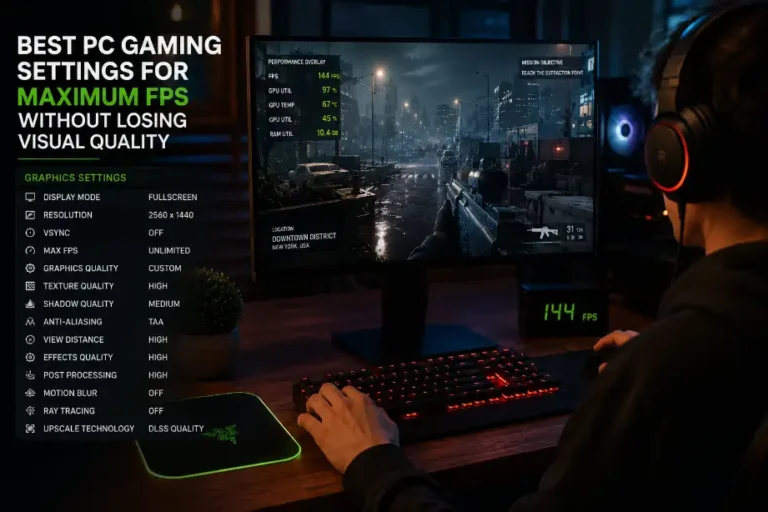
Lower Ray Tracing Settings

Ray tracing consumes significant GPU resources. Reducing ray tracing quality often provides a major performance boost.

Use Upscaling Technologies

AI-based upscaling technologies can increase frame rates while preserving visual fidelity.

Adjust Shadow Quality

Shadows require extensive rendering power. Lower shadow settings often improve performance with minimal visual impact.

Reduce Resolution Scaling

Lowering internal rendering resolution can help maintain smoother frame rates in demanding scenes.

Update Graphics Drivers

GPU manufacturers regularly release driver updates that improve compatibility and optimize performance for new games.

Close Background Applications

Background programs consume system resources. Closing unnecessary applications can free up processing power for gaming.

Future Trends in GPU-Demanding PC Games

Graphics technology continues to advance rapidly. Future titles will likely place even greater demands on gaming hardware.

Several trends already shape the future:

  • More advanced ray tracing systems
  • Improved path tracing technology
  • Larger open-world environments
  • Greater use of artificial intelligence in rendering
  • Higher-resolution assets
  • More realistic physics simulations

Game developers continue to pursue visual realism, which means future GPUs will require even greater processing capabilities.

Conclusion

Modern PC games continue pushing graphical boundaries, making powerful GPUs necessary for smooth gameplay, realistic visuals, and immersive experiences.

F.A.Q

Which game currently demands the most GPU power?

Cyberpunk 2077 with path tracing ranks among the most demanding PC games today.

Is 8GB VRAM enough for modern demanding games?

Many new games run better with 12GB or more VRAM at higher settings.

Does ray tracing significantly affect performance?

Yes, ray tracing can reduce frame rates considerably on many systems.

Which resolution requires the most GPU power?

4K resolution requires much more GPU performance than 1080p or 1440p.

Can AI upscaling improve gaming performance?

Yes, AI upscaling often boosts frame rates while keeping image quality strong.

Are open-world games harder on GPUs?

Yes, large environments require additional rendering power and memory resources.

Should gamers upgrade their GPU for future releases?

Players who want maximum settings and higher resolutions should consider future GPU upgrades.

Similar Posts

Leave a Reply

Your email address will not be published. Required fields are marked *